Skip to content
BitcoinToolkit

ApeCoin (APE): APE Is ApeChain Gas and Also a Multinetwork Token

ApeCoin is the native gas and ecosystem asset of ApeChain and is also represented on external networks including Ethereum. ApeChain is an Arbitrum Orbit chain; APE is an asset, not the chain or an NFT collection. This page focuses on aPE Is ApeChain Gas and Also a Multinetwork Token and the checks users need before holding, transferring or verifying the token.

Use APE on ApeChain or Ethereum while understanding gas, bridge, governance and ecosystem boundaries.

Subject:
ApeCoin
Market mode:
Snapshot Only
Fee asset:
APE
Timezone:
UTC

This page does not bridge APE, vote in governance, value an NFT, guarantee ecosystem access, predict price or audit an ApeChain application.

Content ownership: BitcoinToolkit Editorial Team Technical references: Official protocol and developer documentation. Review approach: Technical explanations are checked against primary sources and updated when the network or asset changes. Last content review: Data integration last tested:

APE Is ApeChain Gas and Also a Multinetwork Token

Network context determines the contract, fee asset and available application.

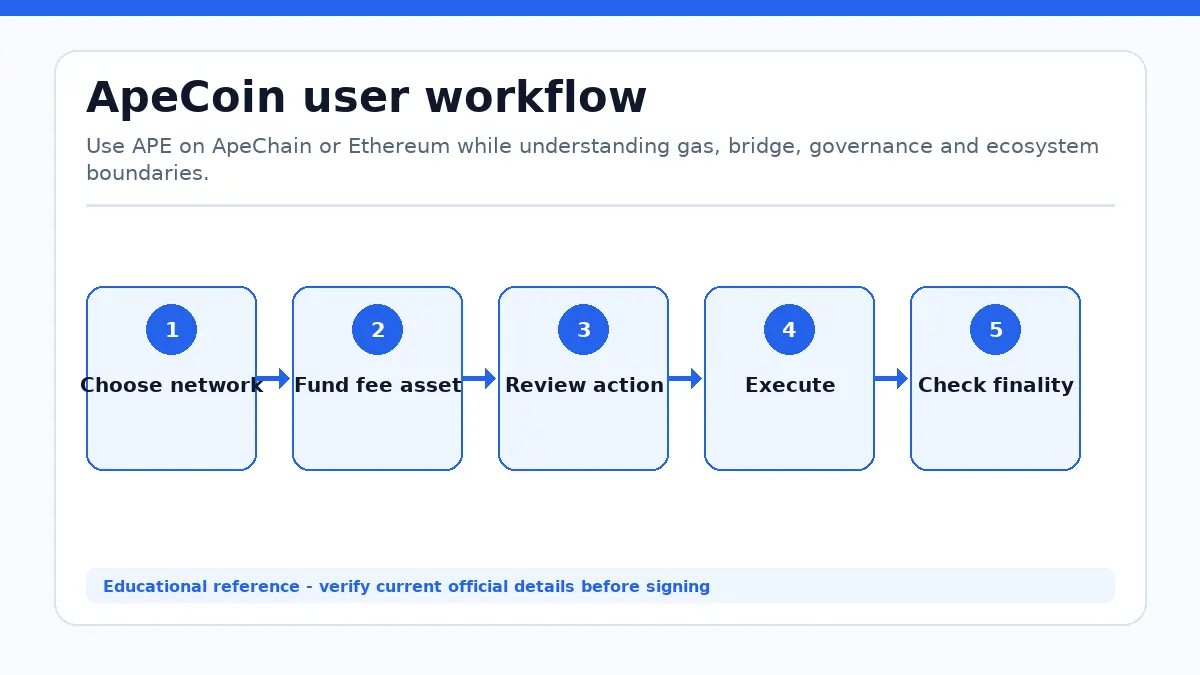
ApeCoin workflow showing Choose network, Fund fee asset, Review action, Execute, Check finality
ApeCoin workflow from the first user decision to a verified outcome.

Native gas and token representations

ApeChain uses APE as its native gas asset, so every ordinary transaction consumes an APE-denominated network fee. APE also has an Ethereum ERC-20 history and can appear through approved routes on other networks. An ApeChain native balance and an Ethereum token balance are not the same ledger entry even when a wallet displays one ticker.

Confirm chain ID, contract when applicable, destination support and gas balance. Keep ETH for Ethereum actions and APE for ApeChain. Never select a withdrawal network only because the ticker matches, and do not assume a copied token on another EVM chain is supported by the official bridge or ecosystem.

ApeCoin Operating Context

A deposit, fast-provider transfer and canonical withdrawal can have different completion and trust assumptions.

Follow source and destination settlement

ApeChain is built with Arbitrum Orbit technology. Movement between Ethereum and ApeChain can involve approval, source-chain settlement, cross-chain messaging and destination credit. The official route, a third-party liquidity route and a centralized exchange withdrawal can each use different contracts, fees, delays and recovery options.

Use the current official interface, read both networks and preserve transaction hashes. Check minimums and provider status before submitting. Do not send to a bridge contract directly or approve an unlimited amount without reviewing the spender. A completed source transaction does not by itself prove that the destination credit is final.

Token Governance Does Not Equal Ownership of Every Ape Brand

APE can support ecosystem decisions without becoming equity or an NFT title deed.

Proposal scope and brand boundaries

ApeCoin governance processes can allocate ecosystem resources or express decisions within their documented authority. ApeChain applications, Yuga Labs products, NFT collections and third-party projects retain separate contracts, terms, administrators and intellectual-property arrangements. Holding APE alone does not transfer a BAYC NFT, company equity or universal product access.

Read proposal text, voting snapshot, quorum, budget recipient and implementation path. Confirm whether a proposal is binding and whether execution needs a multisig or service provider. Treat token ownership, governance participation, product eligibility and brand licensing as four separate questions instead of inferring rights from community association.

Choose the Next ApeCoin Check

The next step depends on whether you transfer, use an application or review governance.

Wallet, application and governance checklist

Transfer users should verify chain, destination and gas. Bridge users should confirm route and both settlement states. Application users should inspect contract, approvals and product terms. Governance participants should verify the official proposal and the wallet snapshot used for voting. NFT users should verify the specific collection contract independently.

Send a small test to a new destination and keep APE for ApeChain fees. Revoke unused approvals and preserve transaction records. Use Ethereum tools for ERC-20 activity, wallet tools for approvals and validators, and current ApeChain documentation for chain-specific behavior.

Browse security tools

ApeCoin Network use FAQ

What pays ApeChain gas?

APE is the native ApeChain gas asset.

Is ApeCoin the same as a BAYC NFT?

No. They are separate assets with different rights.

Does an Ethereum APE balance automatically appear on ApeChain?

No. A supported movement or custody route is required.

What should I verify before a ApeCoin transaction?

Check the official destination, current network, asset representation, amount, recipient and requested permissions. ApeChain executes EVM-compatible applications with APE gas, connects to external liquidity through supported bridge paths, and hosts ecosystem applications whose contracts and permissions remain separate from the token itself. After confirmation, inspect the resulting balance or protocol state instead of relying only on a wallet success message.

Known Limitations

Market Data Methodology

The page uses a CoinGecko aggregated APE/USD snapshot. No exchange chart is rendered for this entity.

Market Snapshot Source
CoinGecko aggregated market data (APE/USD)
Cache
Snapshot cache is approximately 60 seconds.
Failure Handling
Verified cached data is labeled Cached or Delayed. Missing values remain unavailable.
Snapshot Status
Delayed
Report Issue
Report a market-data problem →

Technical Sources

Selected primary sources support the operational explanations. Market-provider attribution remains separate.

Editorial Information

Verified technical content, reviewed sources and update history.

Published
Last Review
Data Verification
Sources
Official documentation